By: Jennifer Gilligan - President IntegraMSP
Have you ever had one of those frantic moments when your software just refuses to cooperate? You’re rushed, stressed, and all you want is for the darn thing to work. So you do what any reasonable human does: you sprint to Google to grab the support number.
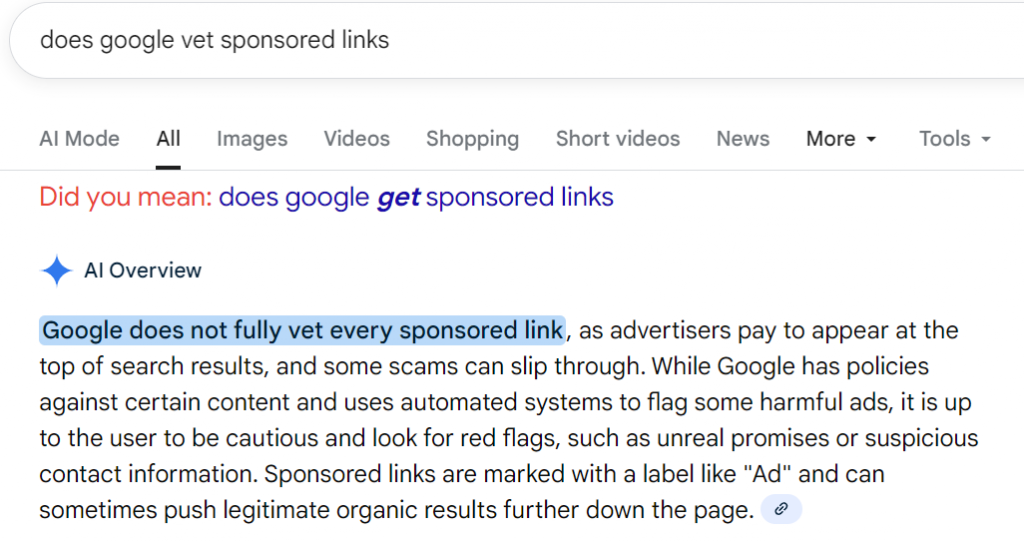
Right at the top, you see a sponsored link. You click it without thinking twice — because who has time to scrutinize URLs when everything feels on fire? Also - Sponsored means VETTED by Google - right? (answer is - doesn't look like it)*.
The page looks identical to your vendor’s support site. Same branding. Same layout. Same reassuring vibe. So why would you question it? You call the number, and someone answers instantly with that “don’t worry, we’ve got you” tone. For the first time in the last 20 minutes, you feel in control again.
Except… you’re not.
You let them onto your computer because, well, you need help. They poke around and tell you something terrifying is happening behind the scenes — and that’s why your software isn’t working. But good news! They can fix it. All you need to do is pay, because your support plan has “lapsed.”
You can’t remember if that’s true, but you do know you need this problem solved yesterday, so you hand over payment info and pray this nightmare ends quickly.
And look at that — maybe the issue gets fixed. Crisis averted. You move on with your day and chalk the weird interaction up to tech just being tech.
Then later, you run into another problem. This time, you use the legitimate support chat built into your actual software. You mention the support agreement you “just renewed.”
And that’s when the floor falls out:
There was no renewal.
There was no support contract.
And the person you paid?
Not your vendor — not even close.
So Now What? (The Part Nobody Wants to Deal With, But Absolutely Has To)
The moment you realize you’ve paid a fake support company is a special kind of stomach-drop — right up there with losing your wallet or discovering your kid just “washed” your phone.
But here’s the good news: you’re not the first person this has happened to, and you’re not stuck.
There is a recovery path — you just need to follow the steps quickly and in the right order.
1. Stop All Contact With the Fake Support Company
Do not call them back to “confirm” anything.
Do not respond to emails.
Do not let them remote in again because they “forgot to fix one last thing.”
They will happily continue milking that access for every drop of money, data, and panic they can get.
2. Disconnect Your Computer From the Internet
Yes, really — pull the plug on Wi-Fi for a moment.
If they installed remote tools or left back doors open, this cuts their connection immediately.
3. Change Your Passwords (All of Them)
Start with:
- Banking / credit card portals
- Payroll or accounting systems (QuickBooks, Sage, etc.)
- Any password that was saved on the compromised device
If you know you’ve been reusing passwords… this is your sign to break that habit.
4. Call Your Bank or Credit Card Provider
Tell them you were scammed.
They will:
- Cancel your card
- Reverse the unauthorized charge (yes, they usually do)
- Block future transactions to the scam merchant
You do not need to feel embarrassed. Banks deal with this all day long.
5. Run a Full Security Scan or Have Your IT Team Audit the Device
This part is critical.
These scam “support” companies often:
- Install remote access tools
- Drop malware
- Change registry settings
- Add fake “security software” that is basically spyware with a logo
Your IT provider (hi, that's us 👋) should:
- Remove any remote access remnants
- Check startup scripts
- Review installed apps
- Verify there’s no active data exfiltration
- Re-secure the system properly
If things look messy enough, wiping the device and starting fresh is sometimes the safest option.
6. Report the Website or Ad
This actually matters — Google does remove malicious advertisers when enough people report them.
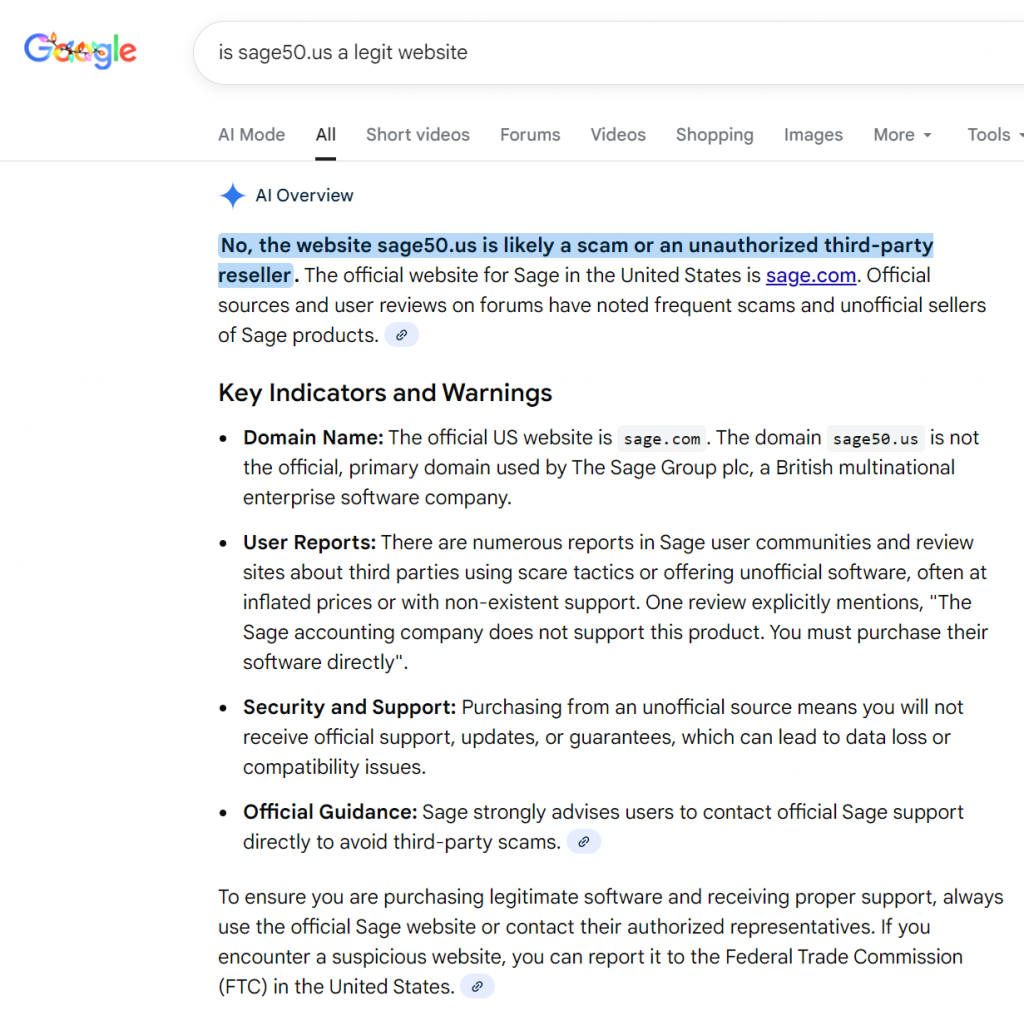
Above image is — exactly the kind of proof that helps Google nuke these from orbit.
7. Learn the Red Flags (So It Doesn’t Happen Again)
This is the part scammers really hate: once you see the pattern, it becomes obvious.
Here’s what to avoid next time:
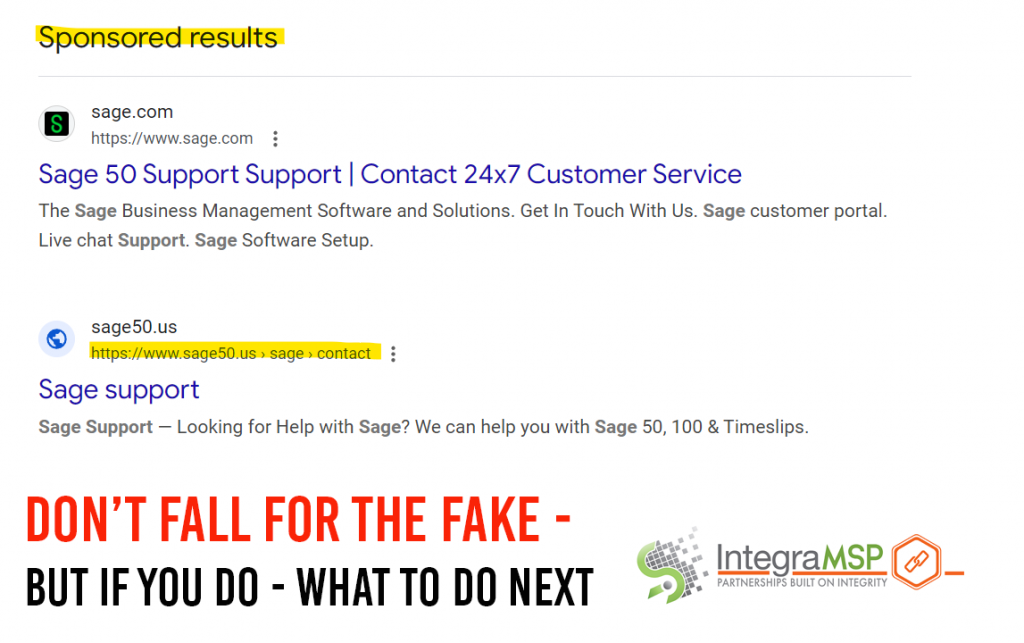
- Sponsored ads pretending to be official support
(Shown above — the legit Sage ad sits right above the fake one.) - Domains that are close… but slightly off
- Correct: sage.com
- Not correct: sage50.us
- Phone numbers that don’t match what’s inside your software
Vendors don’t hide their real support numbers — they put them where you're supposed to find them. - Support demanding payment immediately
If your license is expired, vendors will tell you before you’re locked out. - High-pressure tactics
“Your system is corrupted. You must pay right now.”
No legitimate tech support behaves like a timeshare salesman.
8. Here’s the Real Fix: Stop Googling Support Numbers
This is how the entire scam works — they lure you in with a paid ad that looks legit.
Instead:
- Use the support link inside your software
- Or go directly to the vendor’s official domain
- Or call your managed IT provider so we can handle it for you
Google is great for recipes and stalking old classmates — not so great for finding tech support numbers under pressure.
Let’s Make This the Last Time a Fake “Support Tech” Touches Your System
The truth is, these scams are getting slick. They look real, they sound real, and when you’re stressed and just need help fast, it’s easy to fall into the trap. That doesn’t mean you’re careless — it means the scammers are good at their job.
But here’s the thing: so are we.
Once you know what to look for, these scams lose their magic. And when you have a trusted IT team in your corner, you never have to roll the dice on a random Google ad again. We’re here to keep your systems clean, your data safe, and your day as uneventful as humanly possible — in the best way.
So take a breath. You’re not alone in this, and you’re absolutely not the first person it’s happened to. What matters is what you do next — and we’ve got your back from here.
Call Us Before Calling Strangers on the Internet
If something breaks, glitches, freezes, crashes, or just starts acting weird — call us first.
Not Google.
Not a “Sage support” ad with questionable punctuation.
Not the guy who promises to fix your accounting software at 11 PM for $299 and a prayer.
Call the team that actually knows your systems, your software, and your business.
We’ll tell you whether it’s a real issue, a licensing snag, a vendor outage, or one of those “turn it off and turn it back on” moments. And if it is real? We’ll fix it — without scaring you, upselling you, or installing anything shady on your machine.
Bottom line:
Before you hand control of your computer to a stranger, hand the problem to us.
Your future self (and your bank account) will thank you.
*Reference from Google